

01 · Environment
Designed for the places where work actually happens.
Use lightweight QR workflows at the service desk and connect dedicated service-center operations when deeper execution is required.
Use lightweight QR workflows at the service desk and connect dedicated service-center operations when deeper execution is required.
QR-linked service intake, assets, appointments, parts, maintenance, documents and customer-support workflows.

Universal QR asset record for equipment, furniture, IT devices, tools, machines, medical equipment, and campus assets.
QR-based issue, complaint, helpdesk, maintenance, repair, support, and citizen service request.
Universal QR complaint and grievance record for schools, universities, factories, hospitals, corporates, logistics teams, municipalities, and smart city operations.
QR record for vendors, contractors, service providers, outsourced workers, suppliers, and agency personnel.
QR maintenance work order for repair, preventive maintenance, breakdown, housekeeping, civil, electrical, plumbing, and service tasks.
QR stock, store, bin, medicine, spare part, consumable, book, or material inventory item.
QR document, certificate, license, permit, compliance file, warranty, policy, and contract record.
Universal organization-aware appointment and meeting QR module for consultations, patient reviews, parent meetings, interviews, vendor meetings, service slots, internal reviews, and scheduled interactions.
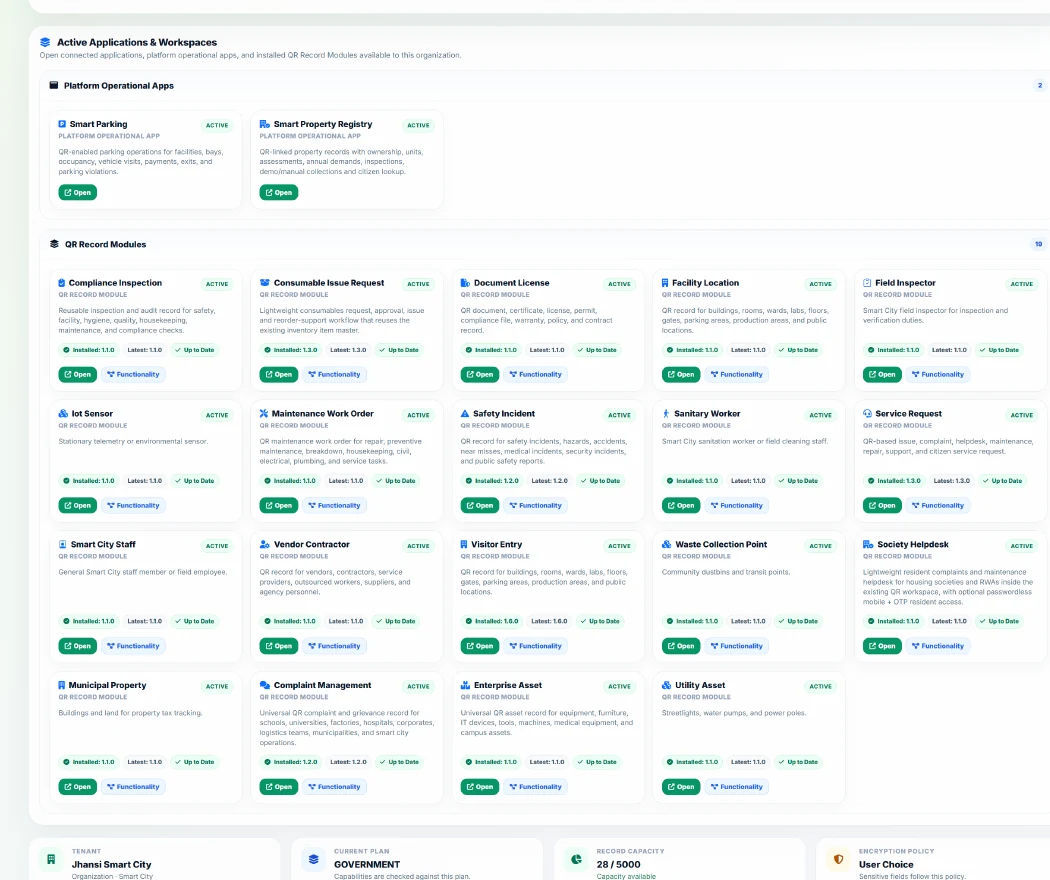
Availability remains governed by organization type, plan, capability requirements and published release state.
Universal QR asset record for equipment, furniture, IT devices, tools, machines, medical equipment, and campus assets.
QR-based issue, complaint, helpdesk, maintenance, repair, support, and citizen service request.
Universal QR complaint and grievance record for schools, universities, factories, hospitals, corporates, logistics teams, municipalities, and smart city operations.
QR record for vendors, contractors, service providers, outsourced workers, suppliers, and agency personnel.
QR maintenance work order for repair, preventive maintenance, breakdown, housekeeping, civil, electrical, plumbing, and service tasks.
QR stock, store, bin, medicine, spare part, consumable, book, or material inventory item.
Start with the lightweight QR layer, install eligible Managed Modules through the Capability Center, and connect deeper operational applications only where required.